About SurePosture
The Microsoft 365 assessment you would write by hand, done in minutes and kept current.
A good consultant can produce this assessment by hand. It takes one to two days of senior time per tenant, it varies between engineers, and it is out of date within weeks. SurePosture turns it into a repeatable service: the first assessment takes minutes, and every one after it shows what changed.
It is built for managed service providers and consultancies that look after many tenants: priced per tenant, white-labelled, and designed around the conversation with the client, from the first findings to the quarterly review.
Principles
What it is built on
Read-only by default
Assessment never needs write access. Automation is a separate consent, off per tenant until an administrator turns it on, and every change is dry-run and approved by a second person.
A check that could not run never looks like a pass
Missing permissions or licences are reported as coverage gaps and excluded from the score in both directions, and the coverage percentage is printed next to it.
Fixes are verified, not claimed
Marking something done is recorded, but only a re-read of the tenant counts it as fixed.
Built for UK partners
UK English, prices in pounds excluding VAT, per-tenant pricing for MSPs, and reports written for the client rather than the engineer.
Assessment
Findings a consultant would write
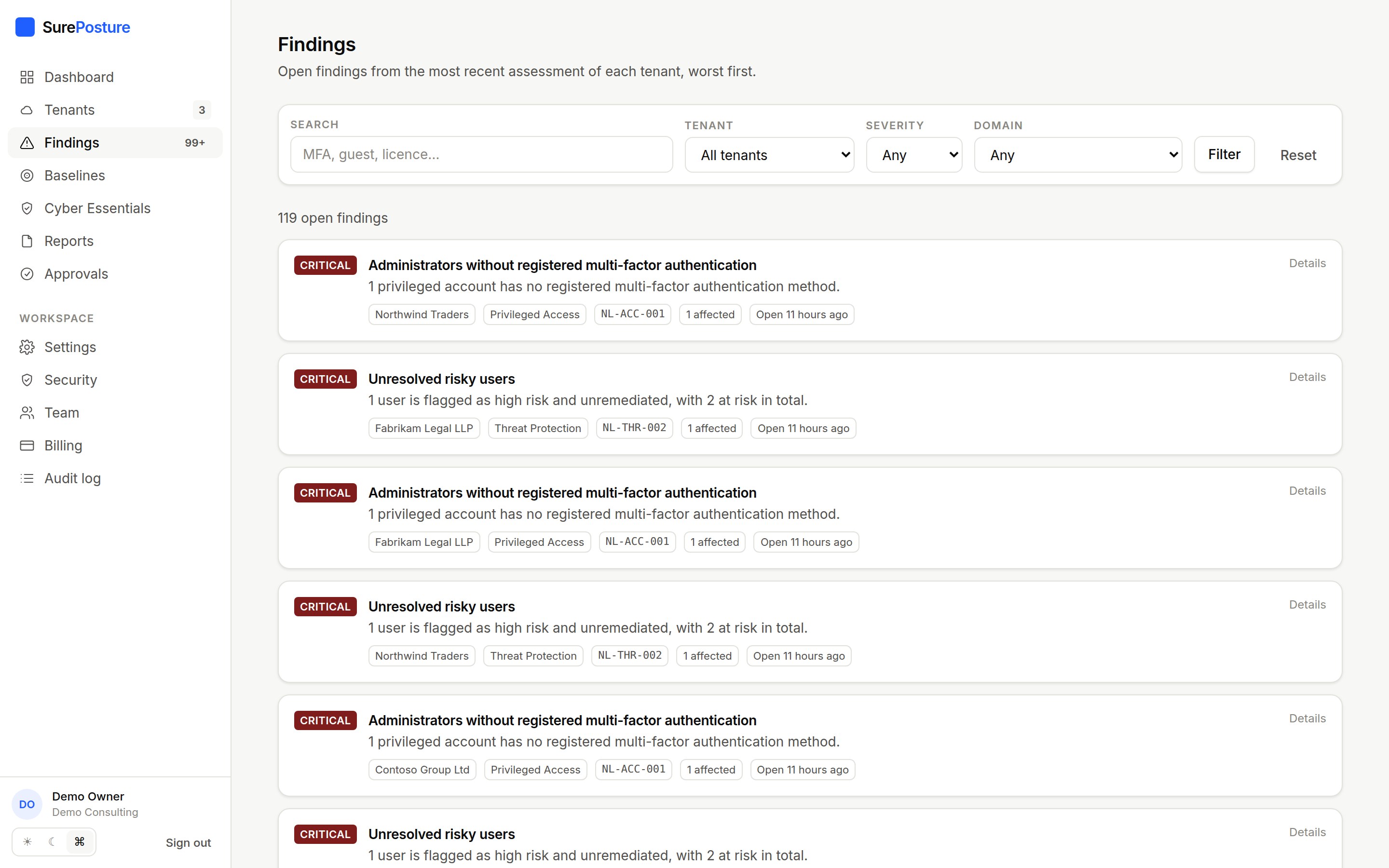
Every control states what was observed, with the numbers in it, why it matters to the business, and exactly how to fix it: portal paths, PowerShell and framework mappings. Findings are ranked worst first across every tenant you manage.
- Evidence attached to every finding
- CIS, NIST CSF, ISO 27001 and Essential Eight mappings
- Risk acceptance with a recorded reason and expiry
Reporting
Reports you can put your name on
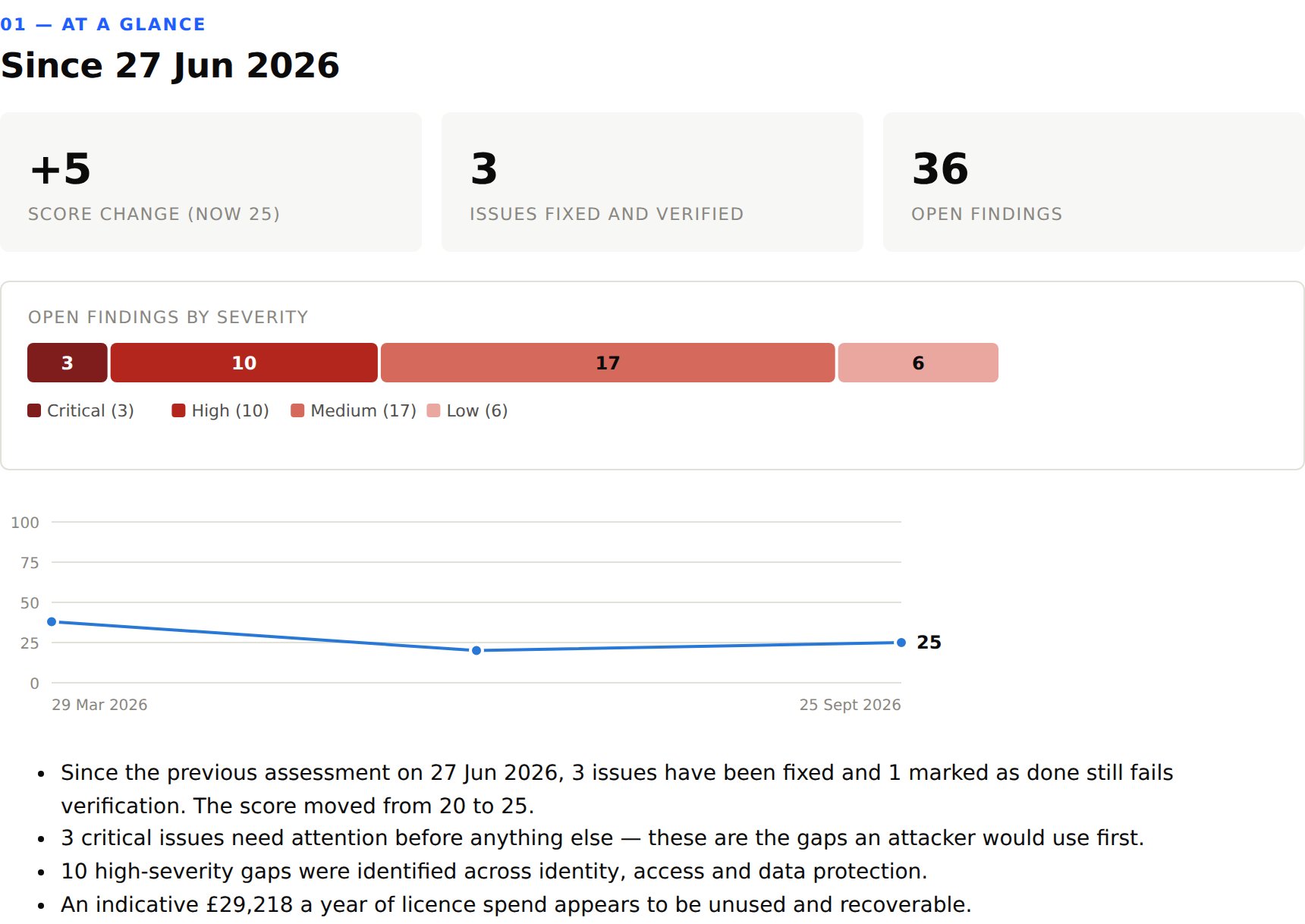
Executive, technical and board reports, and a short client review pack for quarterly meetings. Each has an executive summary, a scorecard, a prioritised roadmap and licensing savings, with your brand on the cover.
- PDF or HTML, generated in under a minute
- Expiring share links for clients
- Hardware budget and trend chart in the review pack
Change tracking
Progress that is verified, not claimed
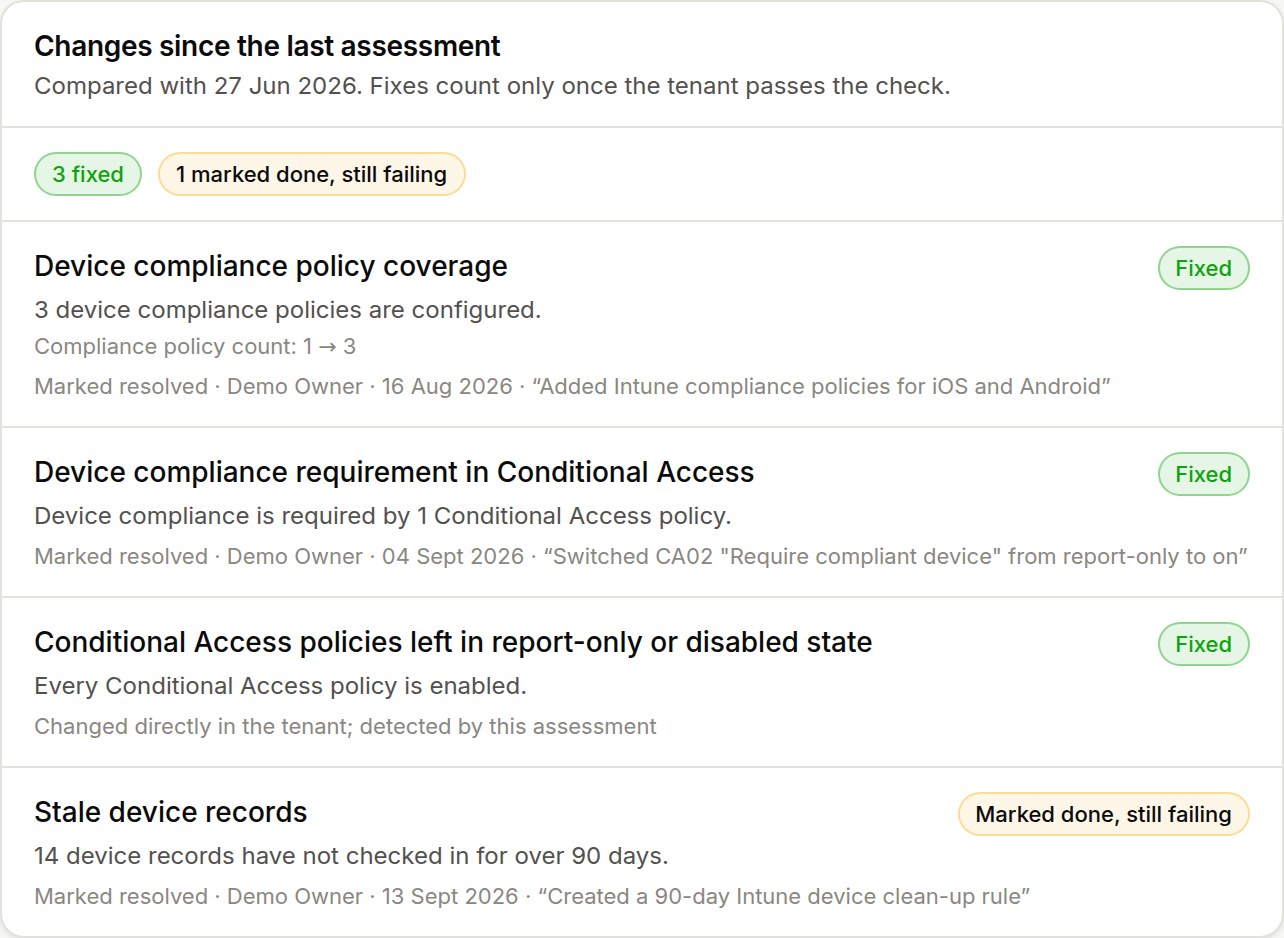
Each assessment is compared with the one before. Fixes are counted only when the tenant passes the check, and credited to the automated change or consultant responsible, with their note. Anything marked done that still fails is called out.
- Fixed, improved, regressed, worsened, new
- The setting that moved, e.g. policy count 1 → 3
- Included in reports and the assessment email
Baselines
One standard across the portfolio
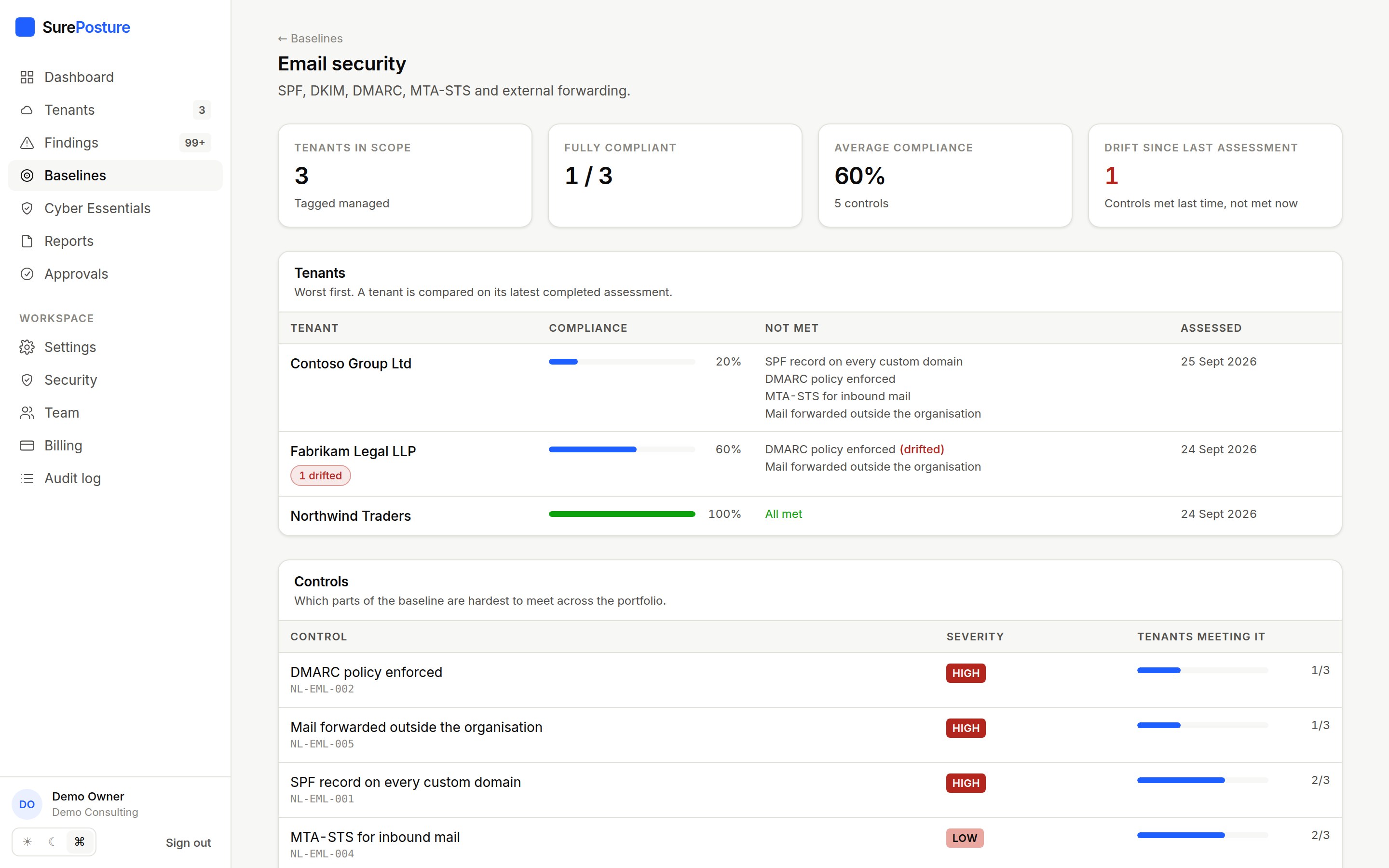
Define the configuration your service promises once and hold every tenant, or every tenant with a given tag, to it. See who meets it, which controls are hardest to meet, and what has drifted since last time.
- Templates: essentials, CIS-aligned, email, everything
- Warnings can optionally count as met
- Unknown is never counted as met
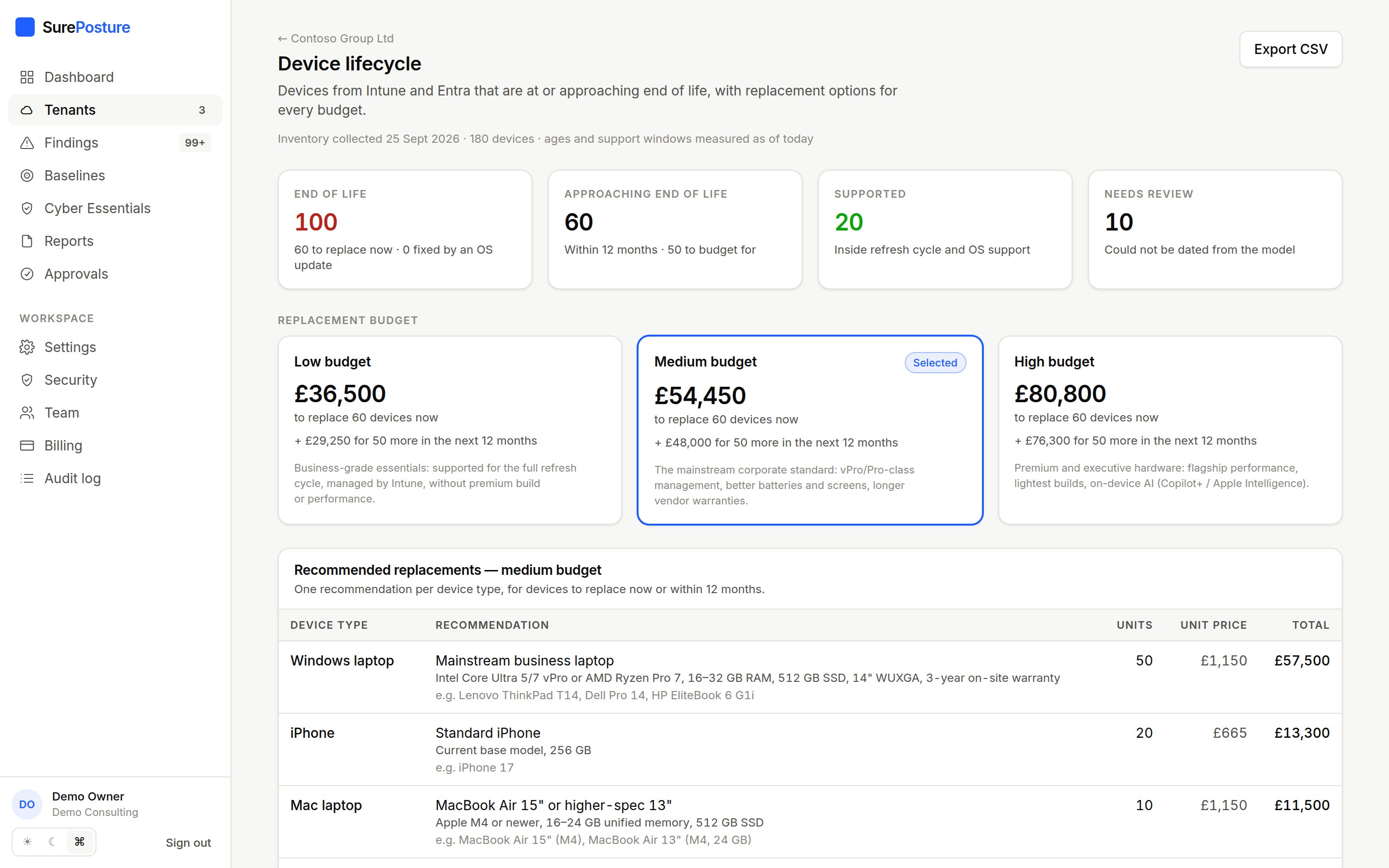
Device lifecycle
Refresh budgets from the Intune inventory
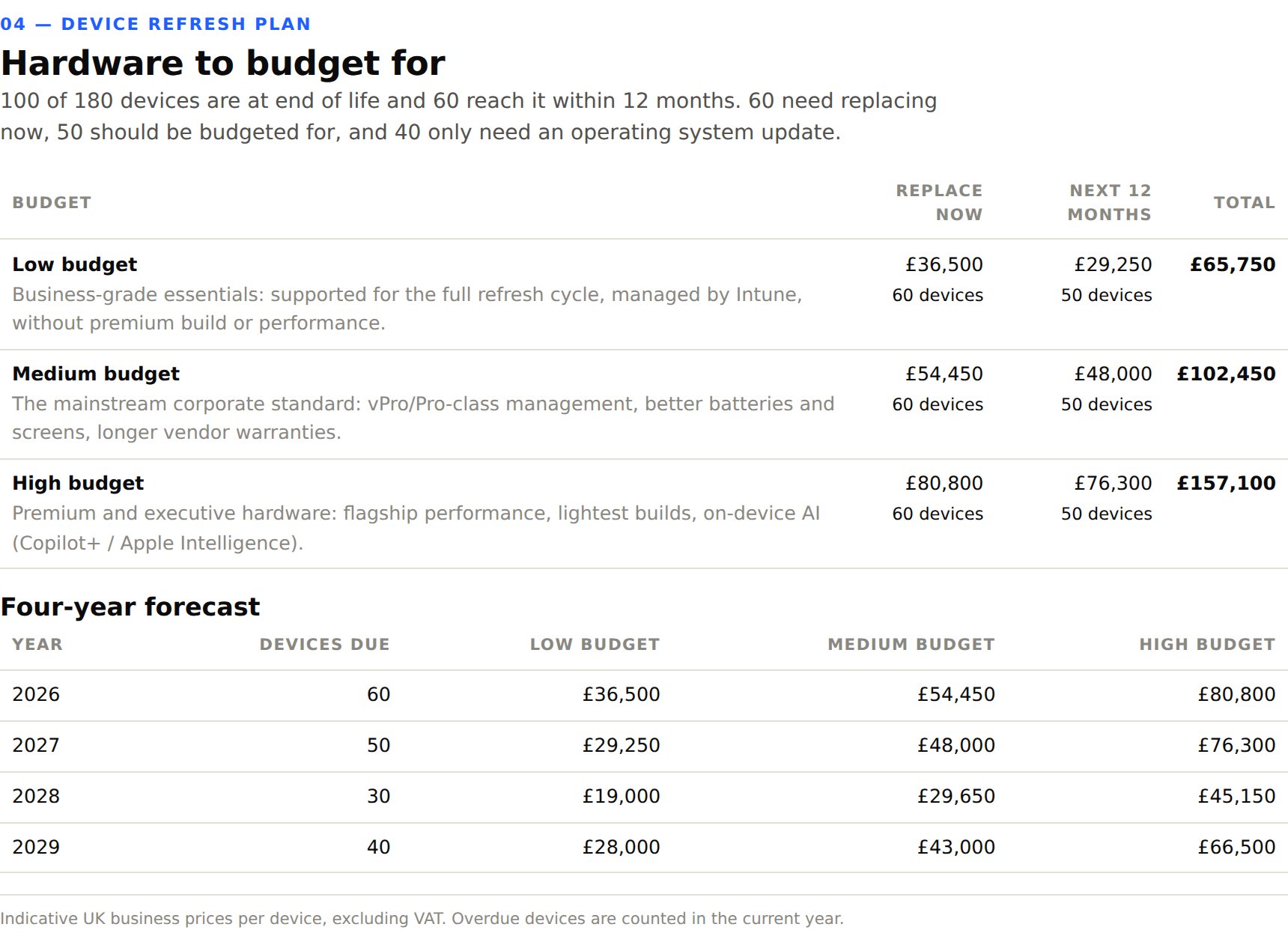
Devices are dated from their model string and checked against their operating system’s support window, so end-of-life hardware is separated from devices that only need an update. Replacements are suggested at low, medium and high budgets.
- Windows 11 eligibility, Intel Macs, capped iPhones and iPads
- Four-year replacement forecast in GBP
- CSV export for procurement
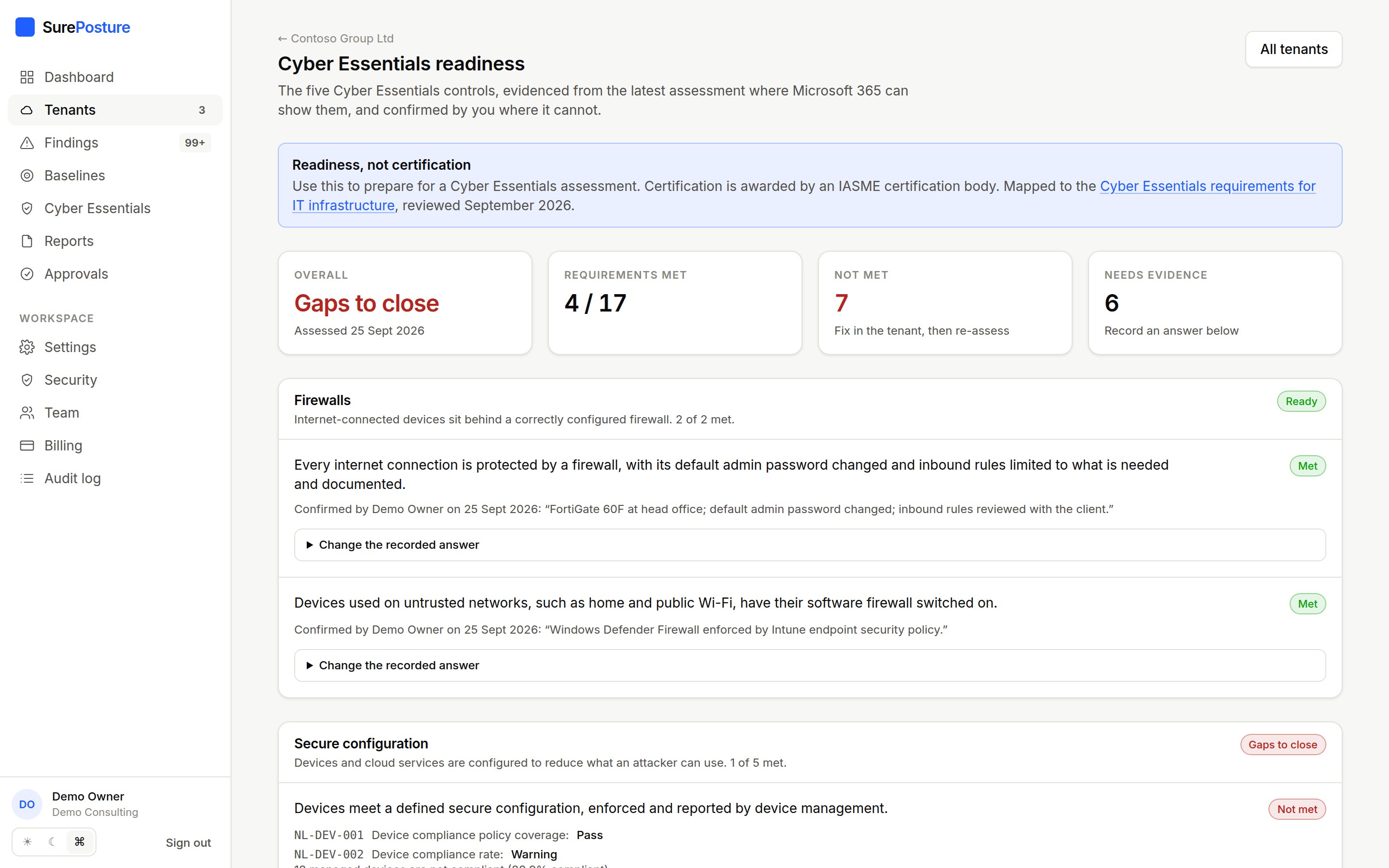
Cyber Essentials
Readiness for the UK’s baseline scheme
The five Cyber Essentials controls, mapped to the checks SurePosture already runs. What Microsoft 365 can prove comes straight from the tenant; what it cannot, such as boundary firewalls and anti-malware, your consultants confirm with a note. Readiness, not certification: that is awarded by an IASME certification body.
- Evidence from MFA, admin, device and OS checks
- Unknown is never counted as met
- Portfolio view and a section in the technical report
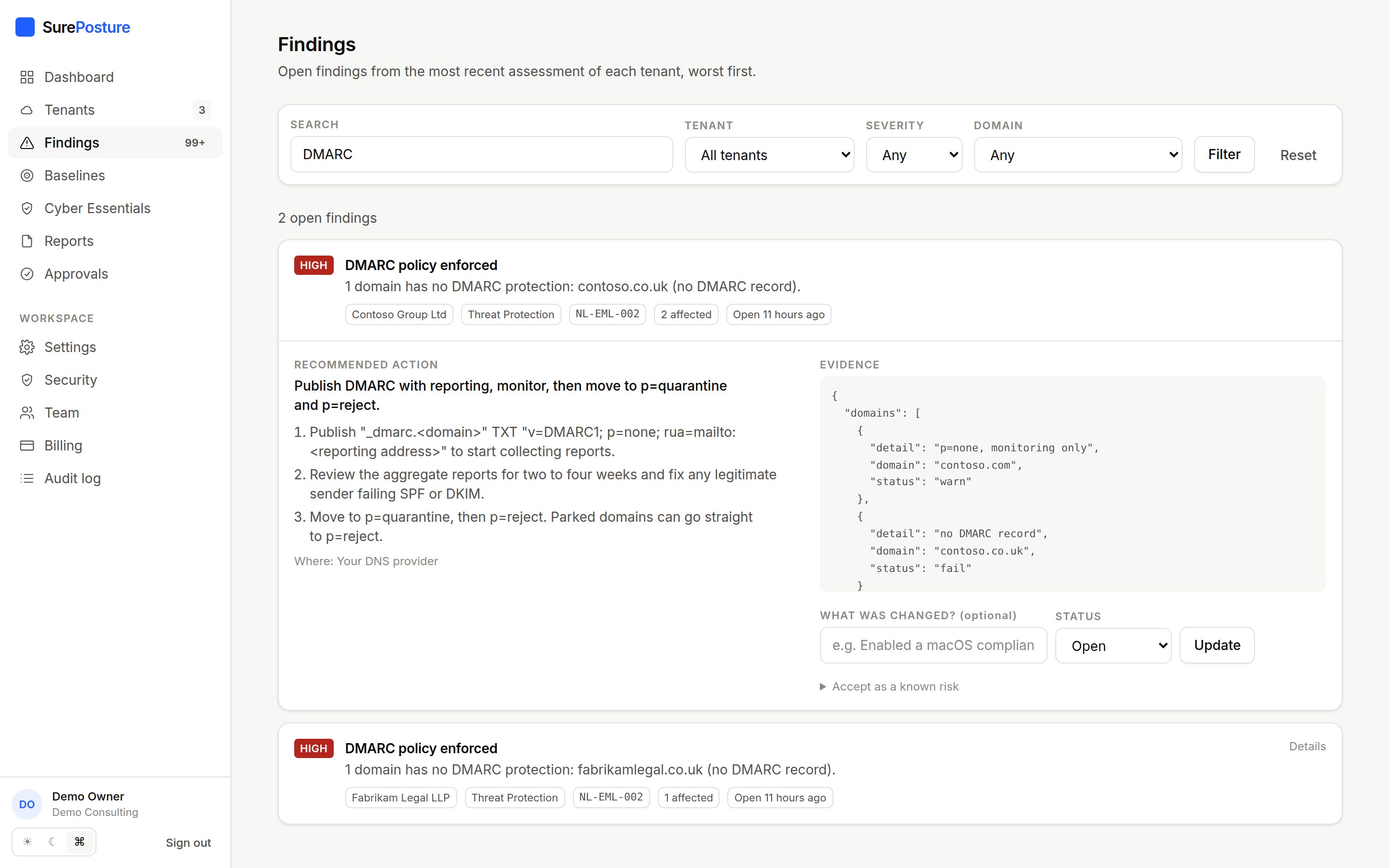
Email security
Spoofing protection on every domain
SPF, DKIM, DMARC and MTA-STS are read from public DNS for every custom domain, including parked ones. Inbox rules that forward mail outside the organisation are found through Microsoft Graph.
- Per-domain evidence and fixes
- Parked domains held to SPF and DMARC
- Reads rule definitions, never mail content
Automation and team
Change control built in, not bolted on.
Approved automation
Selected findings can be fixed automatically. Each change is dry-run against the live tenant, approved by someone other than its author, capped in how many objects it can touch, and recorded with a rollback plan.
Notifications
Email when an assessment finishes (with anything new, worse or drifted), when one fails, when a report is ready and when a change needs approval. Each person can turn them off.
Team and audit
Invite colleagues as admin, consultant or viewer. Consents, assessments, report downloads, finding updates, approvals and changes are all recorded in an audit log.
Control catalogue
Every control SurePosture assesses
53 controls across 8 areas. This list is generated from the product itself, so it is always current.
Identity & Authentication11 controlsHow accounts prove who they are: MFA coverage, passwordless adoption, legacy protocols.
- Multi-factor authentication registration coveragecritical
- Enforcement of multi-factor authentication for all userscritical
- Blocking of legacy authenticationcritical
- Identity baseline: security defaults or Conditional Accesshigh
- Self-service password reset registrationmedium
- Phishing-resistant authentication for administratorshigh
- Identity Protection risk policieshigh
- Conditional Access policies left in report-only or disabled statemedium
- User consent to third-party applicationshigh
- Application registration by non-administratorsmedium
- Password expiration policylow
Privileged Access9 controlsWho holds administrative power, how it is granted, and whether it is time bound.
- Administrators without registered multi-factor authenticationcritical
- Number of Global Administratorshigh
- Privileged roles held by synchronised on-premises accountshigh
- Just-in-time privileged access (PIM)high
- Emergency access (break-glass) accountshigh
- Disabled or dormant accounts holding privileged rolesmedium
- Applications holding high-privilege Graph permissionshigh
- Expired or expiring application credentialsmedium
- Tenant-wide consent grants carrying high-risk scopeshigh
Device & Endpoint8 controlsEnrolment, compliance, update rings and endpoint protection posture.
- Device compliance policy coveragehigh
- Device compliance ratemedium
- Device compliance requirement in Conditional Accesshigh
- Stale device recordslow
- Unmanaged devices in the directorymedium
- Device end of life and replacement planningmedium
- Devices without disk encryptionmedium
- Unsupported operating systems in usehigh
Collaboration & Sharing7 controlsTeams, SharePoint, OneDrive and guest access configuration.
- SharePoint and OneDrive external sharing levelhigh
- Resharing of content by external usersmedium
- Groups and Teams without ownersmedium
- Guest access exposuremedium
- Restrictions on who can invite guestsmedium
- Stale groups and Teamslow
- Restriction of OneDrive sync to managed devicesmedium
Threat Protection8 controlsDefender coverage, alerting, risk detections and incident readiness.
- Microsoft Secure Score against peer averagemedium
- Unresolved risky usershigh
- Ageing unresolved security alertsmedium
- Security and compliance notification contactsmedium
- SPF record on every custom domainhigh
- DMARC policy enforcedhigh
- DKIM signing for domains that send mailmedium
- MTA-STS for inbound maillow
Data Protection1 controlsRetention, sensitivity labelling, DLP coverage and external sharing of content.
- Mail forwarded outside the organisationhigh
Licensing & Cost5 controlsEntitlement use, unassigned seats, duplication and downgrade opportunities.
- Purchased but unassigned licencesmedium
- Licences assigned to disabled accountsmedium
- Licences assigned to dormant accountslow
- Overlapping subscriptionslow
- Accounts without a usage locationlow
Governance & Operations4 controlsLifecycle, ownership, documentation, audit retention and change control.
- Dormant enabled accountsmedium
- Named locations for Conditional Accesslow
- Directory synchronisation healthmedium
- Verified custom domainlow
See it on one of your own tenants.
Fourteen days, one tenant, everything included. No card required.